

Insta Nice
Social App Verified
Specifications
Table of contents
About this app
Social media has become an important part of everyday life. People use platforms like Instagram to share photos and videos and stay connected with friends and family. Many users also look for different tools that can help them explore social media content in a simple and convenient way. Insta Nice is a name that users may come across while searching for Instagram related tools and applications.
Before using Insta Nice it is important to understand what the application actually offers. Its features and functions may depend on the specific version available. Users should check the app information carefully to understand how it works and whether it meets their needs. Choosing a reliable source and protecting personal information are also important when installing any third party application.

What Is Insta Nice?
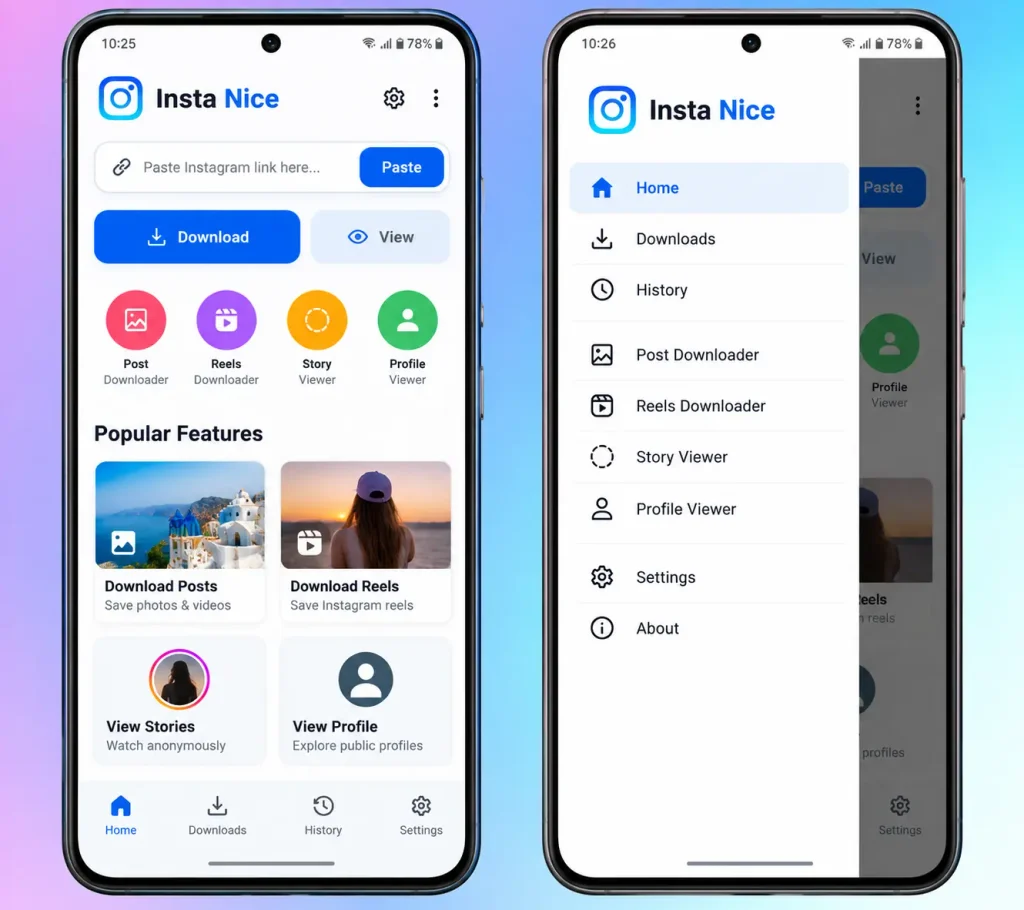
Insta Nice is a name associated with applications or tools related to Instagram. However the exact features of an app using this name cannot be confirmed without checking the specific version. Different applications may use similar names while offering different functions. For this reason users should review the developer information and application details before downloading it.
If you are interested in trying Insta Nice start by checking its official description and available features. Find out whether it is designed for browsing content or providing other Instagram related functions. You should also check whether the application requires an account or asks for personal information. Understanding these details before installation can help you decide whether the app is suitable for you.
Features of Insta Nice
Save Photos and Videos
Insta Nice includes options for saving Instagram photos and videos to your device. This can be useful when you want to keep content for personal reference or view it later. Always respect the original creator’s rights and get permission before sharing someone else’s content.
Story Viewing Options
Some versions of Insta Nice advertise anonymous story viewing. This feature is intended to let users view stories without appearing in the usual viewer list. However its availability and reliability can vary. Always respect other people’s privacy when browsing their content.
Download Reels and Stories
Certain versions offer options to download Reels and Stories. These tools can help users save content they want to revisit. Before downloading or sharing any media make sure you have permission to use it and follow the platform’s rules.
Additional Privacy Controls
Insta Nice may offer extra privacy settings that are not available in the standard Instagram app. Depending on the version these options may change how certain activity appears to other users. Check each setting carefully because third party applications cannot guarantee complete privacy or account protection.
Profile Activity Information
Some versions advertise basic profile analytics that show information about followers and account activity. These tools may help users explore changes in their social media accounts. Keep in mind that such information may not always be accurate or officially supported by Instagram.
Instagram Bot Features
Some releases advertise an Instagram bot for finding profiles and automating certain activities. These functions may be intended for promotional use but automated messaging and data collection can create privacy concerns and may violate platform rules. Review the risks carefully before using these tools.
How to Download and Install Insta Nice
- Find the App: Search for Insta Nice and check the developer information to identify the correct application.
- Check the Details: Read the app description and review its available features before downloading.
- Check Compatibility: Make sure your phone supports the application and has enough storage space.
- Download the App: Use a trusted source APKsbrain to obtain the installation file.
- Install the Application: Follow the instructions displayed on your phone to complete the installation.
- Open the App: Launch the application and explore its available options.
- Review Permissions: Allow only the permissions that are necessary for the app to work.
How to Use Insta Nice?
Starting with Insta Nice is easier when you first understand what the application offers. Open the app on your phone and look through the main screen to see which options are available. If you are new to the application then take a moment to read the instructions and learn how the different sections work. This will help you get familiar with the layout before trying any features.
After exploring the main screen choose the options you want to understand and follow the instructions provided by the application. The available functions may differ depending on the version you have installed. If you are asked to enter your Instagram login details then check the application’s authenticity first. Never share your password or verification codes with an untrusted app or website.
For a better experience check the app settings before using it regularly. Review the permissions and allow only the access needed for the features you want to use. If you notice unexpected requests or suspicious activity stop using the application and check its source. Taking these precautions can help you protect your account and personal information while exploring Insta Nice.
Pros and Cons of Insta Nice
Pros
- A simple interface can make the application easier to understand.
- Clear menus can help users find available options quickly.
- Checking the features beforehand helps users choose a suitable version.
- Compatible applications can be convenient to use on supported devices.
- Reviewing the privacy settings helps users make more informed decisions.
Cons
- The exact features may vary between applications using the same name.
- Some versions may not support every Android device.
- Third party applications can create privacy concerns.
- Unknown installation files may contain harmful software.
- Some functions may require permissions that users do not want to provide.
Help & FAQs
1. What is Insta Nice?
Insta Nice is a name associated with Instagram related tools or applications. Its exact purpose depends on the specific version.
2. Is Insta Nice available for Android?
Availability depends on the application. Check a reliable source to confirm whether an Android version is available.
3. Is Insta Nice free to use?
The price depends on the particular application. Check its official listing for information about free features and possible charges.
4. How can I download Insta Nice?
Find the correct application and verify its developer before downloading it from a trusted source.
5. Is Insta Nice safe to install?
Safety depends on the authenticity of the application and its source. Avoid unknown files and review the permissions before installation.
6. Does Insta Nice work on every phone?
No. Compatibility depends on your phone’s Android version and device requirements. Check these details before installing the app.
Conclusion
Insta Nice may interest users who are searching for tools related to Instagram. However the exact features and purpose of an application using this name should be confirmed before downloading it. Checking the app description and developer details can help you understand what it offers and whether it meets your expectations. It is always better to know what an application does before installing it on your phone.
Before using Insta Nice make sure the application comes from a reliable source and is compatible with your device. Pay attention to privacy settings and avoid sharing your password or personal information with an untrusted app. Taking these simple steps can help you make a more informed choice and keep your device and account safer.