
Snack Video
Joyo Technology Pte. Ltd. Verified




Specifications
Table of contents
About this app
Snack Video is a popular short-video entertainment platform where users can enjoy quick, interesting, and entertaining clips throughout the day. From funny moments and music performances to lifestyle videos, daily activities, and short dramas, the app brings different types of content together in one place. Whether someone wants to relax with a few funny videos or discover something new, Snack Video makes it easy to explore content without spending time searching for individual clips.
But Snack Video is not just about watching videos. It also gives users an opportunity to become creators and share their own experiences. People can record videos, add music, try creative effects, and publish their content for others to enjoy. With features such as trending videos, creator profiles, social interactions, and live streaming, the platform offers a combination of entertainment and community interaction in a simple mobile experience.
What Is Snack Video and How Does Its Video Platform Work?
Snack Video is a short-video social platform designed for people who enjoy watching and sharing bite-sized videos. Instead of choosing a programmer from a fixed schedule, users can simply open the app and scroll through a continuously updated video feed. They may come across comedy clips, music performances, personal stories, educational content, and many other videos created by people from different backgrounds.
One interesting part of the platform is its personalised recommendation system. It helps users discover videos based on their viewing activity and interests. For example, watching or liking certain types of videos may influence the content recommended in the feed. Users can also explore trending videos, search for topics, and visit creator profiles to find more content. This makes discovering new videos feel simple and convenient, although recommendations can differ from one account or region to another.
Snack Video Interface – Home Feed, Trending Videos, and Categories
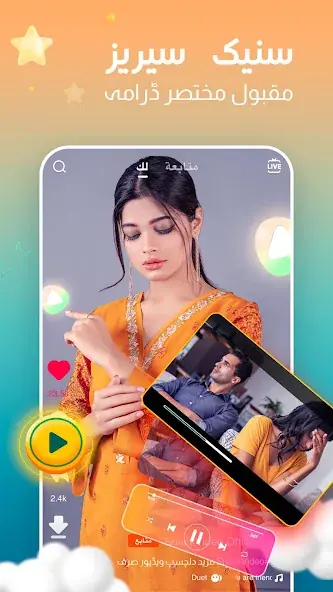
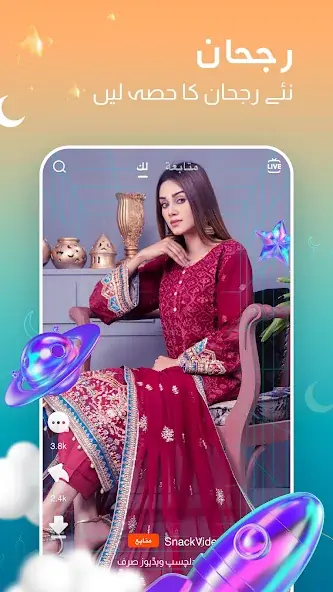
When users open Snack Video, they are welcomed by a video-focused interface that makes browsing content straightforward. The home feed displays recommended clips, allowing viewers to move from one video to another with simple on-screen controls. There is no complicated process involved, so users can quickly find something interesting and enjoy videos at their own pace.
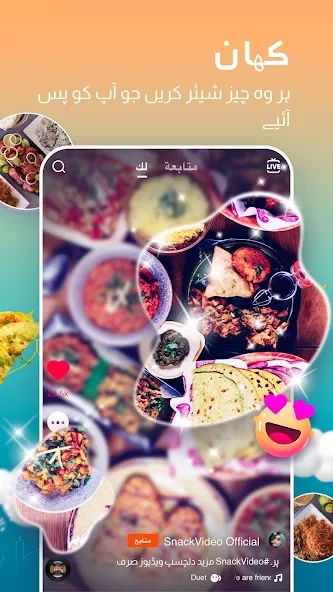
The app also offers ways to explore different types of content. Depending on the version and region, users may find videos related to comedy, music, entertainment, lifestyle, and other popular interests. If they enjoy a particular creator’s content, they can visit that person’s profile to watch more videos. Search and discovery options can also help users find specific topics or accounts.
Another useful aspect of the interface is the connection between watching and creating. After exploring videos, users can move to the available creation tools and start recording their own content. The overall layout is designed to make these activities accessible, although the appearance and location of certain menus may change with app updates.
Key Features of Snack Video – Music, Filters, Effects, and Stickers
Short Video Discovery
Snack Video makes it easy to discover entertaining videos through its personalised home feed. Users can scroll through comedy clips, music performances, lifestyle content, daily activities, and other interesting posts. The recommendations help viewers find videos that match their interests.
Trending Content
The trending section helps users explore videos that are attracting attention on the platform. It gives viewers an opportunity to discover popular clips, new creators, and different types of entertainment. Trending content may change depending on the user’s region and current platform activity.
Music and Audio
Music and audio options allow creators to make their videos more expressive. Users can explore available sounds and add suitable audio to their recordings. This feature is particularly useful for music clips, dance videos, lip-sync content, and other creative posts.
Filters and AR Effects
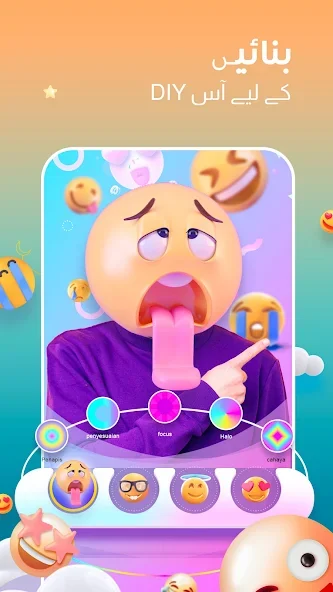
Filters and AR effects give users more creative control over the appearance of their videos. They can experiment with different visual styles, facial effects, and supported camera effects before publishing. These options can make ordinary recordings look more interesting and entertaining.
Live Streaming
Snack Video also supports live-streaming content, allowing users to watch available broadcasts from creators in real time. Depending on the features available to an account, viewers may also be able to interact during a live session. It provides another way to enjoy content beyond regular short videos.
Video Sharing
Users can share interesting videos with friends and other people through the platform’s supported sharing options. This makes it easier to pass along funny clips, entertaining moments, and useful content. Sharing also helps creators reach more viewers outside their immediate audience.
Video Creation and Editing Tools Available in Snack Video
Watching videos can be entertaining, but creating something of your own adds another level of enjoyment. Snack Video provides recording and editing tools that allow users to turn simple ideas and everyday moments into short videos. For example, someone might record a funny situation, share a music performance, capture a daily activity, or create a clip around a personal interest.
Before publishing, users can work with the available editing options to improve their recordings. These may include adding audio, applying visual effects, and making other supported adjustments. Some versions may also offer AI-powered effects or photo templates, giving creators more ways to experiment with their content. Once everything is ready, they can add relevant details and publish the video to their profile.
A good video does not always need complicated editing. Clear lighting, understandable audio, and an interesting subject can make a big difference. Creators should also be careful when using music, images, or video clips that belong to other people. Respecting copyright and platform rules helps make content creation a better experience for everyone. The exact editing tools available may vary between devices and app versions. APKsbrain
Social Features of Snack Video – Likes, Comments, Following, and Sharing
Snack Video is not only a place to watch entertaining clips; it also gives people ways to interact with creators and other viewers. These social features make the experience more engaging because users can respond to videos, share their thoughts, and discover accounts that match their interests.
For example, viewers can like videos they enjoy and leave comments to share their reactions. If they find a creator whose content they regularly enjoy, they can follow that account to make it easier to discover future posts. Sharing options also allow users to send interesting videos to friends or share them through supported services.
Live streaming adds another way to connect with creators. Users can watch available broadcasts and interact through the options provided during a stream. As with any social platform, it is a good idea to communicate respectfully and think carefully before sharing personal details in comments or conversations. These simple precautions can help users enjoy the social side of Snack Video more safely.
FAQs
Can I save my favourite videos on Snack Video?
Snack Video provides video-saving and sharing options for supported content. Depending on the creator’s settings and app version, you may be able to save videos to your device for later viewing.
How can I become a popular creator on Snack Video?
To build an audience, publish original and interesting videos regularly. Use creative ideas, clear audio, suitable effects, and relevant topics to make your content more engaging for viewers.
What types of videos can I watch on Snack Video?
Snack Video offers different types of content, including comedy clips, short dramas, music videos, sports, educational content, family stories, and daily entertainment.
How can I apply for live streaming on Snack Video?
Live streaming access depends on account eligibility. According to the official Snack Video Help Center, users generally need at least 500 followers, must meet the age requirement, and use the latest app version. Account approval is also required.
How can I contact Snack Video customer support?
You can visit the Snack Video Help Center to find answers about accounts, videos, rewards, and live streaming. You can also use the in-app Help Center to report problems and request assistance.
Conclusion
Snack Video brings together short-form entertainment, creative video tools, and social interaction in one mobile application. Users can scroll through personalised content, discover trending videos, follow their favourite creators, and share their own recordings. Features such as music, filters, visual effects, and live streaming add more variety to the overall experience.
Whether you enjoy watching funny clips during a break or creating videos to share with others, Snack Video offers different ways to enjoy short-form content. Like other social platforms, it is worth taking a moment to review privacy settings, understand how your videos are shared, and check the permissions requested by the app. Overall, Snack Video provides a convenient space for discovering entertainment, expressing creativity, and connecting with a wider community through short videos.
Mod features
Extras included in this package.
- Enhanced Video Browsing Experience
- Creative Video Editing Tools
- Music and Audio Options
- Filters and Visual Effects
- Trending Video Discovery
- Easy Video Sharing
- User-Friendly Interface