REGEDDIT MOBILE FF
Level Tecnologia Verified


Specifications
Table of contents
About this app
REGEDDIT MOBILE FF is an Android utility developed for players who want to explore sensitivity recommendations and improve the way they manage controls in Garena Free Fire. The application focuses on different sensitivity configurations, gameplay guidance and suggestions for devices that may struggle with demanding gaming sessions. It is listed in the Tools category on Google Play and is published under the J&J Developer name. Its purpose is to provide additional information for players who want to experiment with their gaming preferences rather than replace the original Free Fire application.
The term Regeddit is commonly associated with configuration adjustments in gaming communities. However, REGEDDIT MOBILE FF describes itself as an independently developed application inspired by that concept. Its Google Play description highlights stable, balanced and fast sensitivity recommendations, alongside tips for reducing lag and crashes. These options may interest players who find their existing controls uncomfortable or want to understand how different sensitivity values affect movement. The application does not guarantee better aiming accuracy or improved match results, since individual performance also depends on practice, device responsiveness and personal playing style.
REGEDDIT MOBILE FF Features and Available Customization Tools
REGEDDIT MOBILE FF focuses on sensitivity guidance and general gameplay recommendations. Its published description identifies several features that are intended to help players understand their control preferences and consider adjustments for different Android devices. The actual recommendations should be treated as suggestions because the developer does not claim that one configuration works equally well for every player. You may be also check MazzRenn Injector
Stable, Balanced and Fast Sensitivity Settings
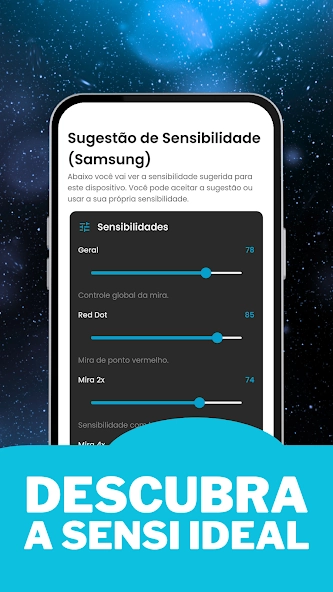
Sensitivity recommendations are the main feature highlighted in the application listing. Players can explore different approaches to camera movement and aiming responsiveness according to their preferred playing style. A faster configuration may feel more suitable for someone who prefers quick movements, while a balanced approach may be easier to manage during controlled aiming situations. The application presents these options as recommendations rather than universal settings.
Recommendations for Reducing Lag and Crashes
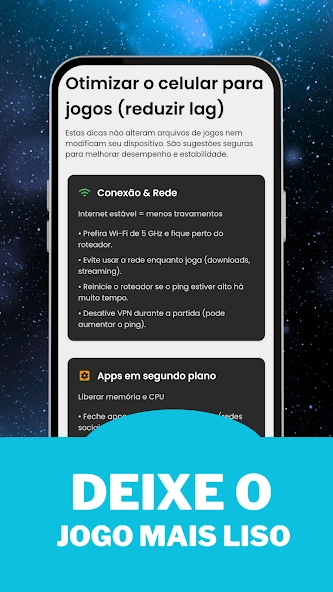
The developer also mentions suggestions intended to help reduce gameplay interruptions. Lag and crashes can result from several technical conditions, including limited available memory, background applications, overheating and software compatibility issues. REGEDDIT MOBILE FF provides guidance related to these concerns, but it should not be considered a guaranteed repair tool or a replacement for proper device troubleshooting.
Tips for Simpler Android Devices
Not every smartphone has the same processing capability or available memory. Players using entry-level devices may need to pay closer attention to graphics settings and background activity. REGEDDIT MOBILE FF advertises tips intended to make gameplay more manageable on simpler smartphones. These recommendations may help users understand possible adjustments, although the actual results depend on the hardware and operating system.
Lightweight and Intuitive Interface
The developer describes the application as lightweight, intuitive and fast. This approach is useful for a tools application because users generally want to locate relevant recommendations without navigating complicated menus. However, the exact interface elements should be checked in the installed version rather than assuming that every advertised option is available in every release.
Gameplay Enhancements and Free Fire Editing Options
Free Fire requires players to coordinate movement, aiming, shooting and camera control during different combat situations. Sensitivity settings influence how quickly the camera responds to finger movements, which makes them an important part of the overall control experience. REGEDDIT MOBILE FF provides recommendations that players can consider when reviewing their existing configurations.
For example, someone who finds camera movement too slow may prefer experimenting with a faster sensitivity setting. Another player who struggles with controlled aiming may prefer a more balanced configuration. The best choice depends on individual preferences, screen dimensions, touch responsiveness and familiarity with the game’s controls. Players should test adjustments gradually rather than changing every value simultaneously.
The application should also be understood correctly in terms of editing functionality. Its published description focuses on sensitivity recommendations and performance-related guidance. It does not establish that the application provides automatic headshots, aimbots, wallhacks or advanced game-file editing. These capabilities should not be attributed to REGEDDIT MOBILE FF without reliable documentation.
There is also an important distinction between adjusting normal game settings and using unauthorised modifications. Players should avoid scripts, modified game clients and tools that interfere with the original game or provide unfair advantages. Such modifications may create account security risks and can violate the game’s rules. Using the available in-game controls and testing legitimate sensitivity recommendations is a more responsible approach.
Settings, Controls, and Personalization Features
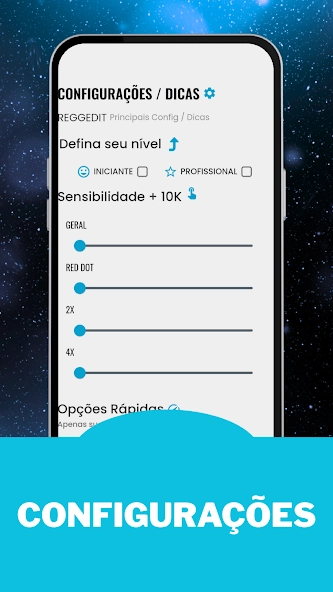
Control personalisation is important because players use different smartphones and have different approaches to aiming and movement. REGEDDIT MOBILE FF is intended to provide sensitivity-related recommendations that users can consider before adjusting their preferences in Free Fire. These recommendations can be useful as a starting point, but they should not be treated as fixed configurations.
Players should pay attention to how camera movement feels during ordinary gameplay. If movements are too sensitive, aiming may become difficult to control. If they are too slow, following moving opponents may feel uncomfortable. Making small adjustments and testing them in a training environment can help players identify settings that feel more natural.
Device performance should also be considered when personalising controls. Screen refresh rate, touch response, available memory and processor capability can all influence the gaming experience. Background applications and excessive device temperature may also affect responsiveness. Sensitivity adjustments alone cannot resolve these hardware or network-related problems.
REGEDDIT MOBILE FF should therefore be viewed as a recommendation tool rather than an application that automatically configures every aspect of a smartphone. The developer’s published information does not confirm that it changes Android system values or modifies Free Fire files directly. Users should check the actual instructions provided inside the application before applying any suggested configuration.
Download, Installation, and Setup Guide for Android
Installing REGEDDIT MOBILE FF Through Google Play
Follow these steps to check and install the application:
- Open Google Play Store on your Android smartphone.
- Search for REGEDDIT MOBILE FF.
- Locate the application published by J&J Developer.
- Confirm that the package information matches the intended application.
- Read the description and review the available data safety information.
- Check whether the application is compatible with your device.
- Select Install if the application is available.
- Wait for the installation process to finish.
- Open the application and review its available recommendations.
Installing an APK Version
Some Android users may encounter REGEDDIT MOBILE FF through third-party APK websites. An external installation file should be checked carefully before use. Confirm the application identifier, developer information and version details wherever possible.
If Android requests permission to install applications from an external source, only enable it when you have a trustworthy file and understand the associated risks. Avoid modified, cracked or repackaged versions because they may contain unwanted software or behave differently from the original application.
Setting Up the Application
After opening REGEDDIT MOBILE FF, review the available options and read the accompanying instructions. If the application presents sensitivity recommendations, compare them with your existing preferences before making changes. Apply any relevant adjustments manually through the official game’s settings unless the developer clearly documents another supported method.
There is no reason to provide your Free Fire account password to a sensitivity recommendation utility. Avoid entering login information into unfamiliar pages or following instructions that request unnecessary access to your gaming account.
Android Compatibility and Updates
The current Google Play listing does not provide a clearly verified minimum Android version or a complete device compatibility table. Users should therefore check the Install option and compatibility information displayed for their particular smartphone.
The listing shows an update dated 30 August 2026. Its published update notes mention general performance and stability improvements, SDK updates for compatibility with newer Android versions, and internal fixes and optimisations. The exact installed version should be checked directly through Google Play rather than relying on version numbers displayed by unrelated download websites.
FAQs
Does REGEDDIT MOBILE FF require an internet connection?
Internet requirements depend on the application’s available functions and version. Check its instructions and test the features to determine which options require an active connection.
Can I use REGEDDIT MOBILE FF on different smartphone brands?
Compatibility depends on Android requirements rather than the smartphone brand alone. Check the Google Play listing to confirm whether your particular device supports the application.
Does REGEDDIT MOBILE FF modify Free Fire game files?
The published application description does not confirm direct game-file modification. Users should follow the documented instructions and avoid unofficial tools that interfere with the original game.
Does REGEDDIT MOBILE FF contain advertisements?
Yes, its Google Play listing indicates that the application contains advertisements. Their frequency and appearance may vary depending on the application version.
How do I update REGEDDIT MOBILE FF to the latest version?
Open Google Play Store, search for REGEDDIT MOBILE FF, and check whether an Update option is available. Installing updates through the official store helps you receive the developer’s published releases.
Conclusion
REGEDDIT MOBILE FF is a specialised Android utility for Free Fire players interested in sensitivity recommendations and practical gameplay guidance. Its published features focus on stable, balanced and fast sensitivity suggestions, recommendations related to lag and crashes, and tips for smartphones with simpler hardware. These functions make it relevant to users who want additional information when reviewing their existing control preferences.
Its limitations are equally important. Sensitivity recommendations cannot guarantee better accuracy, automatic headshots or improved competitive performance. The application should also not be confused with an official Garena product or an advanced game-modification tool. Before installing it, users should verify the developer information, review the available privacy disclosures and choose a trustworthy distribution source. A careful approach to configuration adjustments and device maintenance will provide a more realistic way to evaluate whether the application is useful. At APKsbrain, we always recommend downloading REGEDDIT MOBILE FF directly from the official Google Play Store under J&J Developer, avoiding modified third-party APKs, and never sharing your Garena Free Fire login details with external tools.
Mod features
Extras included in this package.
- Stable Sensitivity Recommendations
- Balanced Sensitivity Settings
- Fast Sensitivity Suggestions
- Lag Reduction Tips
- Crash Prevention Recommendations
- Low-End Device Optimization Tips
- Improved Movement Precision
- Better Control Suggestions
- Smooth Gameplay Recommendations
- Lightweight and User-Friendly Interface
- Personalized Sensitivity Guidance
- Performance and Stability Improvements
- Regular Tips and Updates
- Simple Navigation and Easy Controls
- Android Device Compatibility Improvements